Astro からヘッドレスCMSとしてWordPressを使う(2)
 kenp
kenp前回作成したサイトをレスポンシブ対応していきます。
ニュース一覧部分
---
import type {News} from "@/interfaces";
import { getDate, getUrl } from "@/newsList";

interface Props {
    news: News;
}

const {news} = Astro.props;
---

<li class="item">
	<span class="date">{getDate(news.date)}</span>
	<span class="category">{news.category_name}</span>
	<span class="newsTitle"><a href={getUrl(news.id)}>{news.title}</a></span>
</li>

<style>

	li {
		line-height: 2.5em;
		border-bottom: 1px dashed;
		display: flex;
		flex-direction: row;

		@media (max-width: 900px) {
			flex-direction: column;
		}
	}
	li span:not(:last-child) {
		margin-right: 20px;
	}
	.category {
	    width: 3em;
	    display: inline-block;
	}
</style>
横並びを縦に並び替えています。
カード部分
---
---
<div class="cardList">
<dl>
    <dt></dt>
    <dd>テキストテキスト</dd>
</dl>
<dl>
    <dt></dt>
    <dd>テキスト2テキスト2</dd>
</dl>
<dl>
    <dt></dt>
    <dd>テキスト3テキスト3</dd>
</dl>
</div>

<style>
    .cardList {
        display: flex;
        justify-content: space-around;

		@media (max-width: 900px) {
			flex-direction: column;
		}
    }
    dl dt {
        width: 200px;
        height: 200px;
        background-color: antiquewhite;

		@media (max-width: 900px) {
			margin: 0 auto;;
		}
    }
    dl dd {
        text-align: center;
        margin: 10px;
    }
</style>
横並びを縦に並び替え、画像部分をセンタリングしています。
ヘッダーナビゲーション部分
---
---

<header>
    <h1>
        <a href="/">株式会社XXX</a>
    </h1>

    <div class="menu-wrapper">
        <input type="checkbox" id="menu-toggle" hidden>

        <label class="menu-icon" for="menu-toggle">
            <span></span>
            <span></span>
            <span></span>
        </label>

        <div class="overlay"></div>
        <nav class="menu">
            <ul>
                <li><a href="/about/">企業概要</a></li>
                <li><a href="/news/">ニュース一覧</a></li>
            </ul>
        </nav>
    </div>
</header>

<style>
    header {
        display: flex;
        justify-content: space-between;
        align-items: center;
    }
    nav ul {
        list-style: none;
        display: flex;
        gap: 1em;
    }

    @media (max-width: 900px) {
        .menu-wrapper {
            position: relative;
        }

        .menu-icon {
            width: 40px;
            height: 30px;
            position: fixed;
            top: 45px;
            right: 20px;
            cursor: pointer;
            z-index: 3;
            display: inline-block;
        }

        .menu-icon span {
            display: block;
            height: 4px;
            margin: 6px 0;
            background: #333;
            border-radius: 2px;
            transition: 0.4s;
        }

        /* ハンバーガーがXに変形 */
        #menu-toggle:checked + .menu-icon span:nth-child(1) {
            transform: translateY(10px) rotate(45deg);
        }
        #menu-toggle:checked + .menu-icon span:nth-child(2) {
            opacity: 0;
        }
        #menu-toggle:checked + .menu-icon span:nth-child(3) {
            transform: translateY(-10px) rotate(-45deg);
        }

        /* オーバーレイ背景 */
        .overlay {
            position: fixed;
            inset: 0;
            background: rgba(0,0,0,0.5);
            opacity: 0;
            pointer-events: none;
            transition: 0.4s;
            z-index: 1;
        }

        #menu-toggle:checked ~ .overlay {
            opacity: 1;
            pointer-events: auto;
        }

        /* メニュー本体(右から出す) */
        .menu {
            position: fixed;
            top: 0;
            right: -250px; /* ← 初期位置を左へ */
            width: 250px;
            height: 100%;
            background: #fff;
            box-shadow: 2px 0 8px rgba(0,0,0,0.2);
            transition: left 0.4s ease;
            z-index: 2;
        }

        #menu-toggle:checked ~ .menu {
            right: 0; /* ← 開いたときは左0へ */
        }

        .menu ul {
            list-style: none;
            padding: 60px 20px;
            flex-direction: column;
            gap: 0;
        }

        .menu a {
            text-decoration: none;
            color: #333;
            font-size: 1.2rem;
            transition: color 0.3s;
            width: 100%;
            display: block;
            height: 100%;
            padding: 1em 0;
            border-bottom: 1px solid;
        }

        .menu a:hover {
            color: #007bff;
        }
    }

</style>
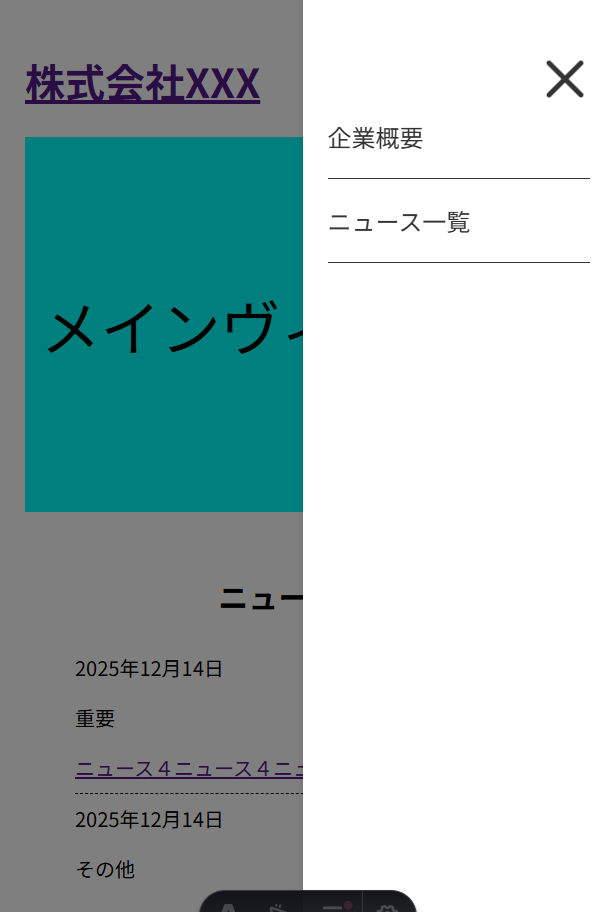
ハンバーガーメニューを追加しています。
JavaScriptを使わず、CSSのみで実装しています。
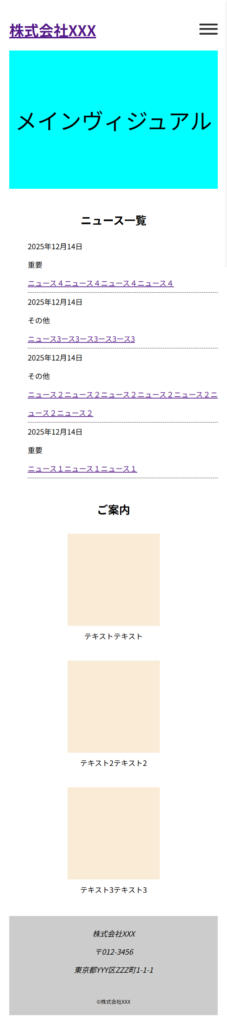
TOPページ画面
ハンバーガーメニューをクリックした時の画面
\ 最新情報をチェック /